Study Guide Maker From PDF: How To Create One Fast With AI
You've got a 400-page textbook, an exam in two weeks, and no study guide in sight. Creating one manually means hours of highlighting, summarizing, and organizing, time most students simply don't have. A study guide maker from PDF can change that equation entirely, using AI to extract key concepts, generate summaries, and build practice materials from uploaded documents in minutes.
This guide walks you through how to create structured study materials from any PDF using AI tools. You'll learn how to prepare your documents, choose the right features, and maximize output quality for actual retention. At ArakStudy, we built our platform specifically to help students in demanding programs like medicine and law turn dense textbooks into actionable study guides, so we'll share exactly what works based on processing millions of pages for students who can't afford to waste time on busywork.
What you need before you turn a PDF into a study guide
You can't build an effective study guide from a PDF without the right starting materials and clear objectives. Most students upload the first file they find and expect perfect results, but a study guide maker from PDF only works as well as what you feed it. Gather your source documents first, then define exactly what you need to learn before running anything through AI.
Source documents that actually work
Your PDFs need to contain actual text, not just scanned images. Files created directly from word processors or digital textbooks work best because the AI can extract sentences, paragraphs, and structure without errors. Scanned PDFs require OCR (optical character recognition), which introduces accuracy issues if the scan quality is poor or the formatting is complex. Check that your file opens in a PDF reader with selectable text before uploading it anywhere.
If you can't highlight and copy text from your PDF, most AI tools will struggle to process it correctly.
Documents with clear headings, chapters, and subsections produce better study guides than dense walls of text. The AI uses these structural markers to identify key concepts and organize summaries logically. PDFs that include diagrams, charts, and tables can also be processed, but results vary depending on the tool's image recognition capabilities.
A clear exam or learning objective
You need to know what type of assessment you're preparing for before generating any materials. Multiple-choice exams require different study approaches than essay-based tests or practical demonstrations. Define whether you need memorization-focused flashcards, conceptual understanding, or problem-solving practice so the AI can prioritize the right information when building your guide. Knowing your objective helps you evaluate whether the generated output actually matches what you'll face during the exam.
Step 1. Clean up and structure your PDF
Your PDF needs preprocessing before any study guide maker from PDF can extract useful information. Raw files often contain cover pages, copyright notices, and blank sections that dilute the AI's focus and waste processing tokens. Remove everything that doesn't contribute to actual learning material, then verify the file structure matches how you'll study the content.
Remove unnecessary pages and content
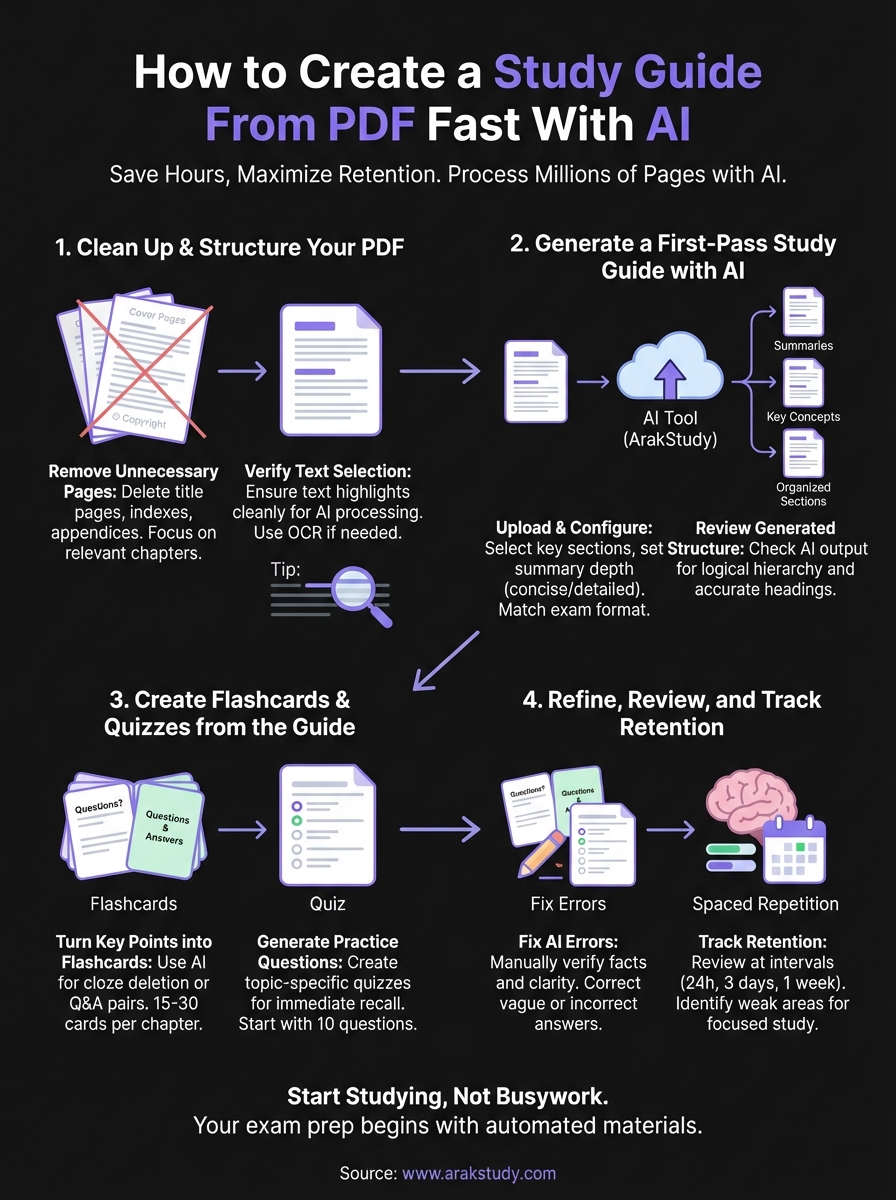
Delete title pages, indexes, and appendices that don't contain testable information. Most AI tools charge based on page count or token usage, so a 400-page textbook with 50 pages of references and acknowledgments becomes a 350-page focused document that processes faster and produces cleaner output. Use your PDF editor to extract only the chapters you're actually being tested on, especially if you're working with comprehensive textbooks that cover multiple semesters of material.
Trimming excess pages before upload can reduce processing time by 30% and improve summary accuracy.
Verify text selection works
Open your cleaned PDF and try highlighting a full paragraph. If the text selects cleanly without skipping words or selecting incorrect characters, your file will process correctly. Files where text appears garbled when copied need OCR conversion before upload, which you can handle through free tools or by re-exporting the document from its original source.
Step 2. Generate a first-pass study guide with AI
Upload your cleaned PDF to a study guide maker from PDF and configure the output parameters before processing. Most platforms let you specify summary depth, content type, and organizational structure based on your exam requirements. Choose settings that match your learning objective: comprehensive overviews for conceptual exams, detailed breakdowns for technical material, or focused key points for memorization-heavy tests.
Upload your PDF and configure the output
Select your cleaned file and specify what sections you want processed. If you're working with a 200-page textbook but only need chapters 4 through 7 for your exam, configure the tool to focus on those specific ranges. Set the summary length based on how much detail you need: concise mode for high-level overviews or detailed mode for complex topics that require deeper explanation. Some tools let you define custom prompts to extract specific types of information like definitions, formulas, or case study examples.
Configure your AI tool to match your exam format before processing, not after you've generated generic summaries.
Review the generated structure
Check that the AI organized your guide into logical sections that match the original document's hierarchy. Verify headings correspond to actual chapter titles and that key concepts appear under the correct categories. This initial review takes five minutes but prevents you from studying disorganized or incorrectly grouped information later.
Step 3. Create flashcards and quizzes from the guide
Your AI-generated study guide contains organized information, but reading summaries doesn't guarantee retention. Convert your guide into active recall materials by generating flashcards and practice quizzes directly from the extracted content. Most study guide makers from PDF include automated features that transform key points into testable questions, but you need to configure them correctly to match your exam format and learning style.
Turn key points into flashcard sets
Select the summary sections where definitions, formulas, or key concepts appear and use your tool's flashcard generator to create question-answer pairs. Configure the AI to produce cloze deletion cards for technical terms or standard Q&A format for conceptual material depending on what you're memorizing. A single chapter summary should generate between 15 and 30 flashcards, though you'll need to verify each card makes sense before adding it to your study deck.

Automated flashcards save hours of manual creation, but you must review every card before studying to catch errors or overly vague questions.
Generate practice questions by topic
Use your study guide's section headings as prompts to create topic-specific quizzes. Request the AI to generate multiple-choice questions for fact-based material and short-answer questions for conceptual topics that require explanation. Start with 10-question quizzes per chapter to test immediate recall after your first review, then increase difficulty by requesting application-based questions that combine multiple concepts.
Step 4. Refine, review, and track retention
Raw AI output from your study guide maker from PDF contains errors that will waste your time if you don't catch them now. Incorrect definitions, misattributed concepts, and vague explanations slip through automated processing regularly, so you need to manually verify every flashcard and quiz question before studying. Schedule your reviews using spaced repetition intervals to move information from short-term recognition into long-term recall, then track which topics require additional passes.
Fix AI-generated errors and gaps
Read through your generated flashcards and compare them against the original PDF sections. Delete cards with incorrect answers, rewrite vague questions that could have multiple interpretations, and add missing context to questions that won't make sense three weeks from now. Common errors include reversed definitions, incomplete explanations, and questions that reference "the above diagram" without including the actual image.
Spending 15 minutes cleaning up AI output saves hours of studying incorrect information later.
Track which concepts stick
Test yourself on your flashcard deck after 24 hours, three days, and one week to identify weak areas. Mark cards you miss repeatedly and generate additional practice questions focused on those specific concepts. Your retention data shows exactly which sections of your study guide need deeper review before the exam.
You're ready to study
You've converted your PDF into a structured study guide, generated active recall materials, and cleaned up the AI output for accuracy. The process took less than an hour instead of the days required for manual summarization, and you now have flashcards, quizzes, and organized summaries ready for spaced repetition review. Your exam preparation starts with actual studying instead of busywork.
A reliable study guide maker from pdf eliminates the manual labor that prevents most students from creating effective review materials. ArakStudy processes textbooks in under two minutes and automatically generates the flashcards, concept maps, and practice questions you need to retain information long-term. Upload your next PDF and test how much faster you can move from reading to actual retention when the preparation work happens automatically.
Try ArakStudy Pro
Experience AI-powered summaries, unlimited flashcards, and concept graphs today. Take your study sessions to the next level.
Start Free Trial